skip to main |
skip to sidebar
Hello.
It's been a long time since I posted something new, useful and innovative in my 108obiee.blogspot.com blog as I have less time for this because my current job now is mostly OFSAA based, but I'm trying to be up to date with all other.
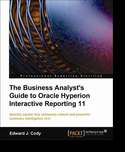
There is one interesting technical book on the market, about which I would now like to say something, not in detail, but describe all chapter in few words. The name of the book is The Business Analyst's Guide to Oracle Hyperion Interactive Reporting 11 (by author Edward J. Cody). This book has been published by Packt Publishing (http://www.packtpub.com). Thanks them for sending me a copy to review it.
The book is intended to primarly Oracle Hyperion Interactive Reporting user, but also may be used from inexperienced users to the business analyst, or we can apply i as the basics for all Oracle Hyperion Interactive Reporting developers. The book is written using EPM 11.1.1.3. Examples are based on Sales and Cost model.
Although we often use this or similar software like this in combination to queries against multidimensional data, examples in this book are focused on relational data source queries.
This book concentrate on usage of Interactive Reporting Web Client software and starts with short introduce to the EPM Workspace. And for those who don't know Oracle Hyperion Interactive Reporting is very powerful analytical and business intelligence engine/tool for ad-hoc querying, data analysis, dashboards, and other reporting capabilities.
The book cover:
Now, on the first chapter - Chapter 1 - Oracle Hyperion Interactive Reporting you'll get an overwiev of Oracle Hyperion Interactive Reporting and EPM Workspace. First navigation to EPM Workspace, how to install and activate Web Client and understand Web Client interface and other useful information on manipulating documents and edit file properties and many more.
How to build efficient query in Interactive Reporting document (file), manage query and get data from the source (database) you'll learn in Chapter 2 - The Query. Also, this chapter covers requests (queries), filters, sorting, how to identify metadata and many more. All this is explained in detail in the appropriate order. It is very easy for someone without experience or for analysts to build a query and get a result data. I have noticed a great filer options, you can build very powerful filter.
Chapter 3 - The Data Model explains data model creation in detail (tables, joins and some advanced features) as pre-requisite for building queries. If you want to play with advanced querying, column expressions and functions, advanced filtering and joins and all that using custom SQL, combining data from separate queries in one query or using subquery - this is well explained in the Chapter 4- Advanced Querying and Filtering, which you should read more carefully and slowly.
The next chapter, Chapter 5 - Results and Tables is more complex and explains table and results sections, what is their mutual relationship and also their relationship with the query section. You'll understand possibilities of filters on these sections, how to do a sorting, create totals and computed items. I must admit that I had to read twice this chapter in order to understand all. It would be good for readers to have some pictures about the table section to completly understand the relation of table section in comparision to results and query section.
Chapter 6 - Pivots, explains how to analyze and present data using pivot sections, from the pivot creation till sorting, analyzing content and adding totals and computed items, using grouping column items, drill functionality and pivot formatting.
Next chapter, Chapter 7 - Charts, explains different chart formats and types and just like all chapter before describes in detail creating charts, adding content, how to analyze data with charts, sorting, grouping, drills and more. Lots of pictures in this chapter.
How to combine reporting objects (pivots, charts, etc) and data in unique view it is written in Chapter 8 - Reports. Understand report layout step by step, adding content, building report tables, using expressions, combining data from multiple datasets, slice data using some advanced features and other.
The last chapter, Chapter 9 - Dashboard, explains how to build an interactive dashboard and provide high level interface to the business analyst. Understand all dashboard elements, add controls (drop down prompt for example), using script editor to write custom code (Java Script I think) and more.
More about the book here https://www.packtpub.com/oracle-hyperion-interactive-reporting-11-1-business-analysts-guide/book.
I've been working as a Oracle Forms & Reports developer for many years and I thought that it would be great to have some of Oracle Forms functionality implemented here in OBIEE. Think about having two OBIEE reports. One is the master and the second is the detail. You may use departments employees or order and order items as an example. In Oracle Forms you'll have two blocks, one is master and the second is detail. When you are located in the first block row (master record) you have possibility to get detail data automatically. In other words detail records are fetched immediately when a user queries the master record.
After some time of thinking I figured out the way how to do that in OBIEE and what is the best way to present it. I'll show how to implement master-detail requests navigation using HTML form text field on the master report along with iframes and using javascript events. The idea is to have master and detail reports in the same dashboard page, and including dashboard prompt. In the first report we have one text field (HTML form) in which the cursor is positioned automatically so we use this field to jump on the next or the previous master record, and as the result we are getting immediately detail report. Each report is placed in its own iframe. So, basically we navigate from the master to details on changing a record in the master request. I'll explain the whole process, from the building master-detail reports navigation to final customization.
So I want to have something like this:

Steps
Step one - building master and detail reports
Master

Detail

Master request shows categories and detail shows top ten products ranked by amount sold for the current row master category.
Step two - building current iframe custom expression on master request including both requests using concatenated iframes and placing it in the narrative view to establish navigation in the same page between reports without losing window focus
Current iframe contains two concatenated iframes. Each iframe is build for one request and the detail request iframe is placed below the master. Each iframe has name. We use this column to place it in the narrative view of the master request because we'll show it on the dashboard to show automatically both reports (frames).
Current iframe:

Better view:

As you can see the master request column TIMES.CALENDAR_YEAR is filtered by dashboard prompt presentation variable. When the request is placed inside iframe the classic navigation with column filter set to is prompted is not working so we use presentation variable to pick up value from the dashboard prompt and place it in the master iframe request.
Place current iframe column in narrattive view:

Step three - HTML form text field and javascript events implementation on the master request, triggering detail request when validate master record
Column product category on the master contains complex detail request navigation:

Better view:

Explanation what we have done with the code above:
We made form field for activating navigation, the text field is readonly. OnKeyDown javascript event disables backspace, delete and return keys to disallow user to change it (product category must be visible and not changed). Form text field need to be editable for triggering details. Enter and down-arrow key use tab key to validate next row. OnSelect javascript event opens detail request URL in the iframe and transfers all filters from the master request. OnClick javascript event select all in the text field (prevention if the user decides to click on the field). The focus is always in the master field. Finally we customize the form and hide editable functionality from the user.
Step four - build the dashboard prompt and dashboard page

Show only narrative view:

Step five - the final look and test
Initial:
The position is on the editable field and the detail request is automatically refreshed. You can press enter, tab or down-arrow to cross into new master row and validate detail request record for the current master. The focus is on the same page because we use iframes, so we refresh only detail iframe.


Unfortunately previous master row navigation can be established only using shift+tab or shift+enter keys.
This is my first post using Essbase, and Essbase-OBIEE. I'm playing with Essbase for a while and will publish something from time to time here on 108obiee.
In this post I showed how to handle unbalanced employees hierarchy using multiple logical table sources in dimension logical table, using relational source.
Today I'll explain two different examples. In the first one there will be some basics how to load HR employees in Essbase BSO cube with using parent-child (value based, recursive dimension) member relationship and member consolidation method. But in the second example I'll be happy to get in Essbase the same as in this post:
1. Unbalanced employees hierarchy
2. Data information for each employee - salary as well as the sum of salary first level down if the current employee is a manager and has employees under him
I choose BSO data storage because I only have one dimension with not to many members (I don't count accounts dimension). Employees dimension will be tagged as sparse dimension and accounts dimension as dense and everything in this examples will be stored in the database/cube. In example two I'll use some calculations in BSO members, and for that Essbase is using Calculator, or Calc language. It's only for BSO outlines. For ASO outlines Essbase uses MDX language. There are very similar and you can translate Calculator Functions (BSO) to MDX Functions (ASO), for more information read Essbase Technical Reference.
Example one - using parent member consolidation method to load member measure data into BSO cube
Lets make a simple OLAP model using EIS. We use Oracle HR as datatsource and add employees table as dimension table and user-defined table for a fact table, because we need to have fact table, if we don't we receive errors like no table is selected as a fact table and logical join is required in OLAP model, so we must have dimension and fact table to populate OLAP model.

User-defined fact table:

Employees dimension table and user-defined fact relation is 1:1. It's not really 1:N. I put this u-d fact table just to populate OLAP model and be able to made metaoutline later. Employees hierarchy is value-based (self referencial join). This kind of dimension is called recursive dimension.
You can find great info about this in Oracle Essbase Integration Services Online Help.
Recursive dimension:

Logical join between employees dimension and fact:

EMPLOYEES.SALARY has SUM as aggregation rule as well as EMPLOYEES.DUMMY_MEASURE.
At this point we save changes to our OLAP model and begin to create a metaotline with this OLAP model.
I'm trying to find out what is the secret and how Essbase load the data into cube. I supose that because we have here parent-child relationship between the members the process of loading the data will take first the leaf level (the last level), level 0 in the employees hierarchy and try to find the data in the fact table via the logical join. If the level 0 member has data in the fact table the measure value and the cell will be populate. Now, because this dimension is sparse and this is the only dimension that I use in this example (I don't count account dimension which hold actually measures and it is defined as dense) I'll expect single-celled blocks (or two-celled blocks, because we have two measures) as much as we have members in our sparse employees dimension. In this example all level 0 members exists in the fact table so there will be no members with missing values in empty cells. After level 0 members are loaded the parent level members will be loaded into cube in upper level blocks according to consolidation rules in parent members.
From the documentation we learned that Essbase stores data values in data blocks. Essbase creates a data block for each unique combination of sparse dimension members (providing that at least one data value exists for the combination). Each data block contains all the dense dimension member values for its unique combination of sparse dimension members. I our case for example, it creates one data block for the member 109 for example, which is level 0 employee member. This data block contains all measures (account values) for 109.
This is how I setup my metaoutline:

I choose child column member EMPLOYEES.EMPLOYEE_ID to put in the employees dimension. With that I have a possibility to use child alias that refer to child member.

We use EMPLOYEES.EMAIL alias for EMPLOYEES.EMPLOYEE_ID member.

This is very basic setup and I didn't use any of advanced features in dimension or metaoutline properties.
Note that I'm not using data rules to load data into Essbase cube, this I'll use in one of my future posts.
Choose consolidation method addition and store data as data storage type for both measures:

The same properties we choose on the EMPLOYEES.EMPLOYEE_ID member properties, in the metaoutline.
On the OLAP metaoutline properties we choose block storage as data storage option.
Next step is to load members and the data:

Loading results:
SELECT
/*+ */
aa."MANAGER_ID",
aa."EMPLOYEE_ID",
aa."EMAIL"
FROM
HR.EMPLOYEES aa
108 members have been added to dimension "EMPLOYEES".
2 members have been added to dimension "Accounts".
110 members have been added to outline.
Dataload SQL 1:
SELECT
aa."EMPLOYEE_ID",
SUM(aa."SALARY"),
SUM(aa."DUMMY_MEASURE")
FROM
(
select
employee_id,
manager_id,
department_id,
job_id,
salary,
1 as dummy_measure
from employees
) aa
WHERE
aa."EMPLOYEE_ID" is NOT NULL
GROUP BY aa."EMPLOYEE_ID"
If you want to query the server log after the loading process you may find this interesting:
108 members have been added to dimension "EMPLOYEES".
2 members have been added to dimension "Accounts".
110 members have been added to outline.
EssbaseAPI: Declared Dimension Sizes = [109 3 ]
EssbaseAPI: Actual Dimension Sizes = [105 3 ]
EssbaseAPI: The number of Dynamic Calc Non-Store Members = [0 0 ]
EssbaseAPI: The number of Dynamic Calc Store Members = [0 0 ]
EssbaseAPI: The logical block size is [3]
EssbaseAPI: Maximum Declared Blocks is [109] with data block size of [3]
EssbaseAPI: Maximum Actual Possible Blocks is [105] with data block size of [3]
EssbaseAPI: Converted [105] index entries
Successfully completed Member load for metaoutline:Metaoutline3 Application:BSOHrApp DB:BSOHrDb User:admin (Records Loaded: 108, Records Rejected: 0)
EssbaseAPI: Data Load Updated [35] cells
The next step is going to EAS/BSOHrDb database properties:


One thing I don't understand here. It's said that 90 block are with level 0 and that is pretty clear because if you do a query:
select count(*) from employees a
where not exists
(
select 1
from employees
where manager_id=a.employee_id
)
order by a.employee_id
You'll get 90 leaf level rows.
Count upper-level members:
select
count(distinct manager_id)
from employees
where manager_id is not null
You would get 18 rows but for some reason we get only 15 rows in the statistics tab in the database outline properties.
Note: when the upper generation member has only one generation member below itself (201-202, 205-206 and 102-103) Essbase will store only the second one (lower level, 202, 206 and 103), so this explain number of 15 upper-level blocks. Upper members 201, 205 and 102 are not stored.
Employees preview in outline:

With this setup/load only the point one is satisfied:
1. Unbalanced employees hierarchy
2. Data information for each employee - salary as well as the sum of salary first level down if the current employee is a manager and has employees under him
The point two is not because:
1. We have defined consolidation method addition on members and measures
2. Data is loaded first at lower 0 levels and then according to consolidation upper levels are loaded.
Lets make a simple test in Answers after importing BSOHrApp and BSOHrDb into OBIEE Administrator and setup all thre layers correctly (don't forget to set hierarchy type of employees dimension to unbalanced).
OBIEE Physical layer:

BMM:

Test in Answers:

DUMMY_MEASURE counts how many leaf levels (0 levels) are under the current generation member passing through all the branches to the lowest level or lowest generation.
Measure values at this generation (Gen2) are the result of the sum of the previous generations (Gen3):

Drill to the generation 4 employees:

Drill to generation 5 employees from SHIGGINS (employee_id=205):

It seems like SHIGGINS and WGIETZ have same values for both measures which is correct because there is only one level under the SHIGGINS and it summarize data below him.
The same is for LDEHAAN and AHUNOLD:

Ok, that is for this example in which we showed how Essbase load the data and how the upper levels are loaded according consolidation (addition in our case) method.
Example two - loading raw HR employees data into BSO cube without using consolidation method in measures and members, showing employees salary and sum of the salary first level down
Make a new OLAP model in EIS:

It is very similar like the previous model except we changed the code in user-defined fact table:

select
employee_id,
manager_id,
salary,
cast(null as NUMBER) as sum_salary_first_level_down
from employees
And we set aggregation rule for both fact measures to NONE:


The reason why we remove the aggregation rule from both measures is that we want to load raw data into Essbase BSO cube, salary for each employee and the sum of the salary first level down. We need to be sure that no aggregation is used in that case. In the example one we showed how aggregation and member consolidation work.
Note: the alternative for showing each employee salary is to define attribute dimension with the salary attribute and then associate it with the employees dimension but I don't want to associate manually salary to each employee member in EAS and I can associate attribute member to only level zero employees members so this solution is not good.
I use cast(null as NUMBER) as sum_salary_first_level_down in the user-defined fact table to pre-define measure so I can use it in the EIS metaoutline to write some formula that will calculate sum_salary_first_level_down and store it in the cube as separate measure, along with the salary measure, which presents employee salary.
Metaoutline:

Set consolidation to ignore (~), on all members:

Both measures have data storage set to store data.
Open the sum_salary_first_level_down member properties and in the formula tab enter the calculation formula:
@SUMRANGE("SALARY",@RELATIVE(@CURRMBR("EMPLOYEES"),@CURGEN("EMPLOYEES")+1));
This will calculate desired sum.

After loading members and data we go to EAS, refresh application list and query our new database/cube properties:


Level 0 and upper-level block numbers are correct.
EAS outline:

See that members are not using consolidation so we expect raw data in the cube. BSO Calculator formula which we have defined in the EIS is visible on the sum_salary_first_level_down:

The first cube preview in EAS looks fine, 24000 is the salary of the employee_id 100 (SKING) and 170400 summarize salary first level down:

If you drill to the first level down:

Quick test in Answers (after importing a cube into BI Administration):

Drill down to generation 3 members:

Drill down to generation 4 members:

Drill down to generation 5 members:

Note that in all part drills the sum of the salary (grand total) matchs the sum_salary_first_level_down in the previous generation member, so we got the desired result.